Book it. Track it.Get paid.
Run Your Online Store in Pakistan From One Dashboard.Every parcel, every rupee of COD and your real profit in one place, with WhatsApp built in.
Made for Pakistan. New accounts get 14 days of Pro, free.
Trusted by online stores across Pakistan. Built by FABXERS.
A real FABTRACK store. Customer details are blurred to protect their privacy.
Running a COD Store Means Juggling Too Many Tools
Most online stores in Pakistan sell on Cash on Delivery and use more than one way to deliver. Orders live in WooCommerce or Shopify, parcels in courier portals, money in your head, and customers in WhatsApp. Every day you stitch it all together by hand.
FABTRACK brings it together: one dashboard for orders, couriers, cash, profit and customers.
Every courier has its own portal
PostEx here, Leopards there, your own riders in a notebook. To know where parcels are, you log into three places.
COD money is hard to follow
Which orders are paid, which are still with the courier, and what will actually reach your bank after fees and tax? Most stores find out late.
Fake and risky orders cost you twice
A parcel that comes back still costs you delivery charges both ways. Without a warning before you ship, the same numbers and cities keep hurting you.
You do not know your real profit
Sales look good, but after product cost, delivery charges and returns, what is left? Spreadsheets get old the day after you make them.
Customers keep asking about their order
Confirmation, dispatch and delivery messages are written by hand, one WhatsApp at a time. Customers still ask: where is my order?
Past customers and carts are forgotten
People who stopped ordering, or left at checkout, never hear from you again. That is money left on the table.
See it working
This is what your day looks like in FABTRACK
Real screens from a real store. Tap a picture to enlarge.Click any picture to see it bigger.
Your last 30 days on one screen
Parcels booked, delivered and returned, your success rate, and how that compares with the 30 days before. A daily chart and the courier, city and best-selling product results sit right under the numbers.
- ✓Up or down against the previous 30 days
- ✓Where every parcel stands: delivered, on the way, returned
- ✓Which courier, which cities and which products sell most
Every order and every courier in one list
Orders from your store with the courier status next to each one. Filter by date, status or courier, print airway bills and open any order in one click.
- ✓PostEx, Leopards and your own riders side by side
- ✓Search by order number, name or phone
- ✓A risk badge on every order
Know the risk, confirm the order, message the customer
Each order shows a fraud risk score with the reasons. Note the result of your confirmation call and send a ready WhatsApp message without typing a word.
- ✓Low, Medium or High risk before you ship
- ✓Confirmed, No Answer, Callback, Wrong Number
- ✓WhatsApp messages in one tap, with the number fixed for you
Every parcel and every rupee of COD
See what is delivered, what is settled and what is still pending with the courier. Courier fee and COD tax are saved for every parcel.
- ✓COD settled and COD pending at a glance
- ✓Courier fee and tax per parcel
- ✓Export to CSV for your accountant
Your real profit, after cost and delivery
Enter what each product costs you and FABTRACK shows profit per order and for any dates, after delivery charges and returns.
- ✓Profit by day and by product
- ✓Real delivery charges replace estimates after delivery
- ✓Dashboard shows profit for today and this month
Delivery and return rates that point to problems
See which courier delivers best, how many parcels come back and how orders move over time.
- ✓Delivery rate and return (RTO) rate
- ✓City-wise results and return reasons
- ✓Compare PostEx, Leopards and your own riders
Customers grouped for you
Repeat, VIP and Dormant customers are found automatically, so you know who to thank and who to win back.
- ✓Import the customers you already have
- ✓Search by name, phone or city
- ✓Send a campaign to a whole group
See which emails were delivered and opened
Every email FABTRACK sends to your customers is listed with its status, so you know it arrived and whether it was read.
- ✓Sent, delivered, opened and clicked at a glance
- ✓A chart of the last 30 days
- ✓Every email in a list, newest first
Products and stock
Change stock and prices in one tap, and get alerts when a product runs low.
Automatic customer emails
Order confirmation, dispatched with tracking, delivered and more. Switch each one on or off.
Customer names, phone numbers, addresses and tracking numbers are blurred in these pictures to protect their privacy.
Everything You Need to Run a COD Business
Shipping, cash, customers and your team, together in one app. Pick a topic to see what is inside.
From the moment an order arrives to the moment it is delivered.
Book from one order page
Book PostEx or Leopards in a few clicks, or assign your own rider. Customer details are filled in for you and the CN is saved on the order.
Airway bills and loadsheets
Print the airway bill for a parcel and a loadsheet for the courier's pickup, straight from FABTRACK.
Live tracking with the full journey
See the current status and every step from booking to delivery, right inside the order. Statuses refresh in the background automatically, as often as every hour.
Your store updates itself
In WooCommerce, delivered parcels move to Completed and returned parcels to Cancelled on their own. Booked parcels get their own status, like Booked at PostEx or Booked at Leopards.
Know the risk before you ship
Every order gets a Low, Medium or High risk score with the reasons: earlier returns on the same phone number, many orders from one number in a day, a big first COD order, a city with many returns, a missing phone number.
Confirm orders by call
Note what happened on the call: Confirmed, No Answer, Callback, Wrong Number or Cancelled. Your whole team sees the latest result on the order.
Leopards, in depth
See the delivery charges, COD insurance, fuel and GST before you book, send re-attempt or return advice, and view proof of delivery with the receiver and signature.
Your own ridersWooCommerce
Deliver with your own riders too. Assign a rider and a fee, update the status, mark cash as received, and always know how much cash riders still owe you.
Some of these are part of the Pro plan, and every new account gets 14 days of Pro to try them. See exactly what is free in Pricing.
Meet ASK Agent: an AI that reads your store and tells you what to do next
Ask a question in your own words and ASK Agent checks your orders, couriers, COD, carts, products and Google numbers by itself, then explains what it found. Or connect Claude or another AI app to FABTRACK and let it work with your real numbers, always read only, and with your approval before anything changes in your shop.
How it connects
Reports go out to the AI. Customer phone numbers, addresses and emails never do. Changes come back only as drafts that you approve.
ASK Agent, built in
Ask in Roman Urdu, Urdu or English. It picks the right reports itself, checks them one after another and tells you what it found and what to do next. Six quick-answer buttons are free.
Connect Claude or another AI app
Make a private key in Settings and paste it into an AI app that supports MCP connectors, such as Claude. It can read your reports, never customer phones, addresses or emails. Revoke the key any time.
AI drafts, you approve
Ask your AI to write product titles, descriptions, tags, category text, SEO titles and stock ideas. They arrive as drafts: see before and after, edit, then Approve & apply.
Undo anything
Everything an AI changes after your approval is saved together with what was there before. One click puts the old text back.
SEO with Google Search Console
Connect Google (read only) and see your clicks, the searches that bring people, your best pages, and where a better title could win more clicks.
Did my change help?
Compare the days before and after a change, and get a weekly check-up that points to what needs your attention first.
You stay in control: how an AI draft reaches your shop
The AI writes a draft
Product text, tags, SEO title and more. Nothing is changed in your shop yet.
You read it
See the old text next to the new one. Edit a word if you like.
You press Approve & apply
Only now does FABTRACK write it to your shop, with your own store keys.
Undo any time
The old text is saved. One click and it is back.
- Read only
- Customer details never go to the AI
- You approve every change
- Private chats, deleted after 30 days
- Revoke the key any time
AI features are part of Pro, and every new account starts with 14 days of Pro. ASK Agent has a fair daily limit on typed questions. AI can make mistakes, so check important numbers on their page. See how your data is handled in the Privacy Policy.
Android apps
FABTRACK in your pocket
Run your store from your phone, and give your riders their own app. Same login, same data as the web.
FABTRACK for stores
The things you do every day, without opening a laptop.
Team roles work in the app too. Marketing, emails, analytics and profit need the Pro plan, as on the web. Store connection, courier keys, team and billing stay on the web.
- ✓Orders: search, filter, add and edit, with the fraud risk badge
- ✓Book PostEx, Leopards or your own riders, and print airway bills
- ✓WhatsApp, call and notes on every order, in one tap
- ✓Shipments, COD and rider cash, and your real profit
- ✓Products: stock, prices, bulk edit, categories and new products
- ✓Customers, abandoned carts, analytics, email campaigns and automatic emails
- ✓Alerts on your phone for new orders, cancellations and low stock
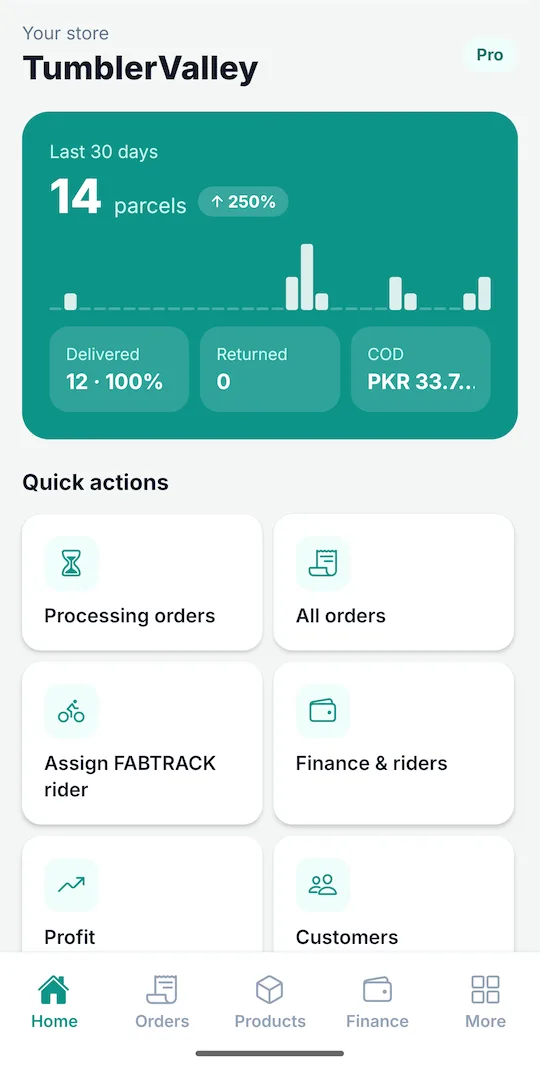
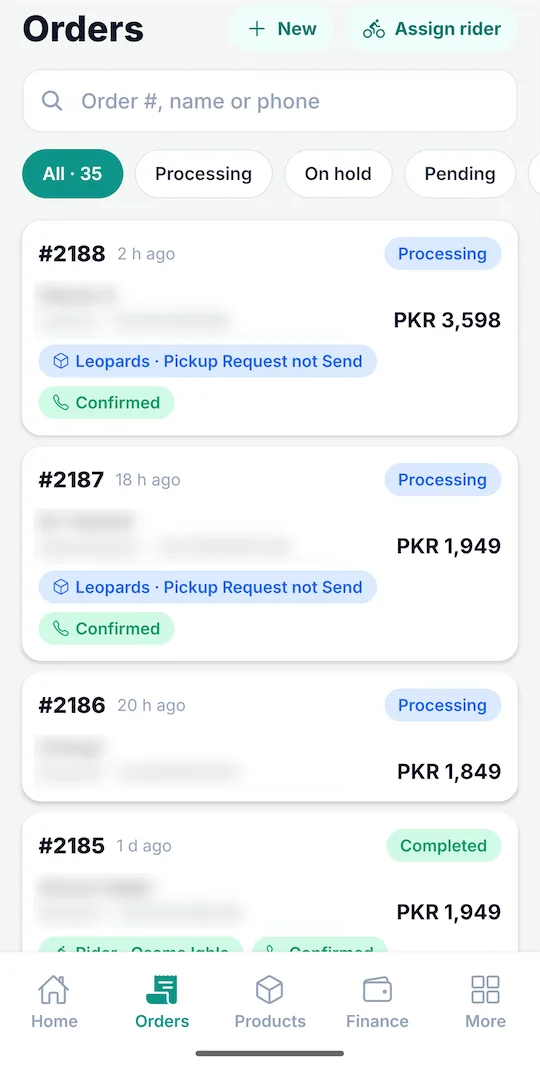
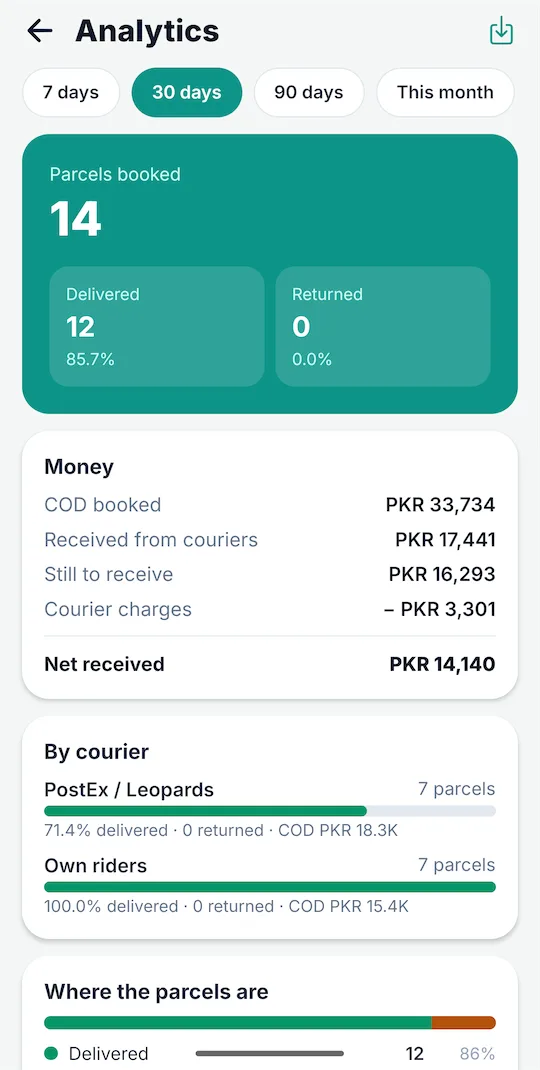
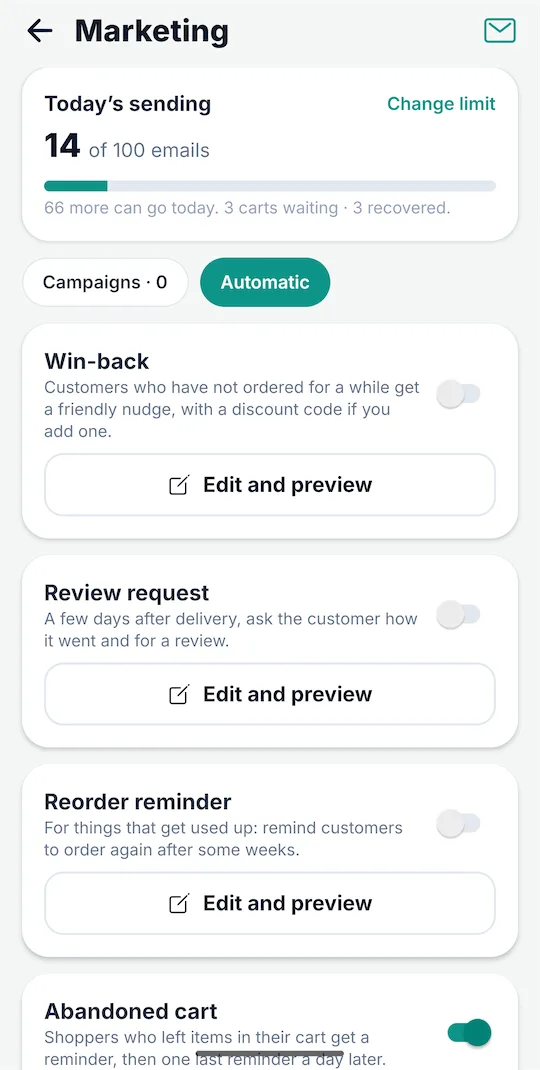
Customer names, phone numbers and addresses are blurred to protect their privacy.
FABTRACK Riders
For delivery riders. Stores that use FABTRACK can give orders to approved riders in their area.
- ✓New jobs in your areas, with a notification
- ✓Pickup and delivery details, call and map in a tap
- ✓Customer delivery code and a delivery photo as proof
- ✓Cash collected, your fee and your ratings
- ✓Approved by FABTRACK; stores assign jobs by area
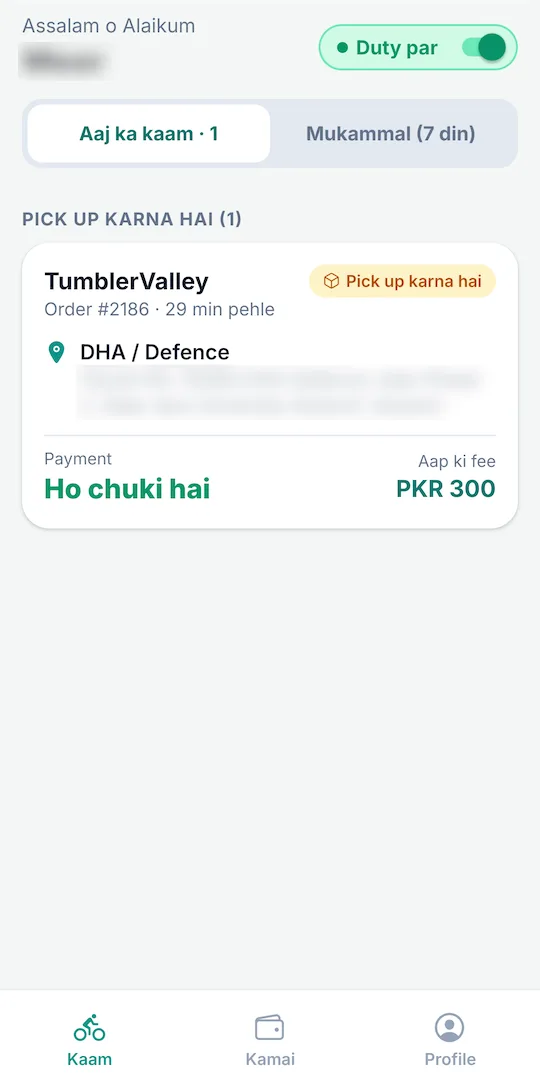
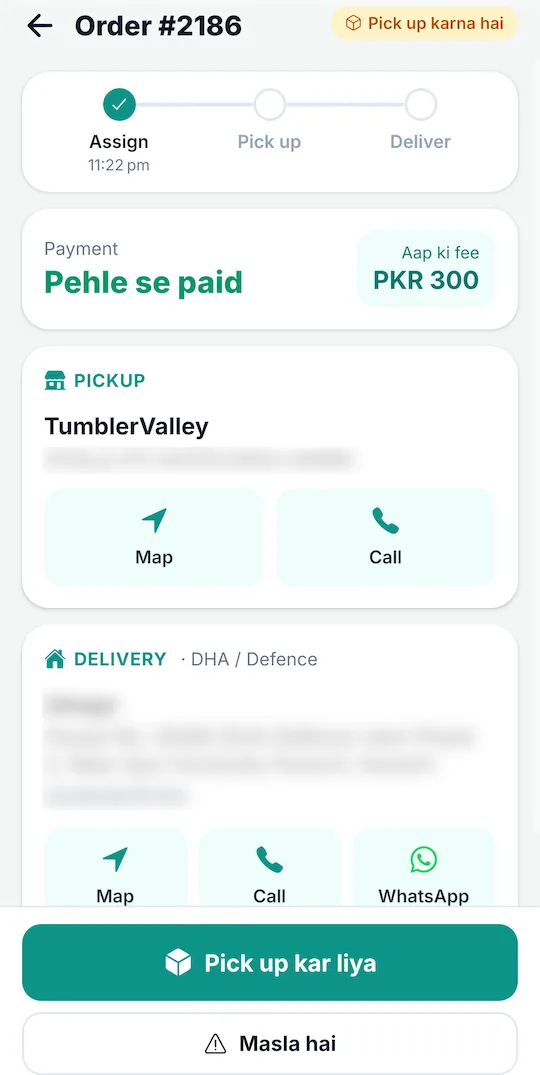
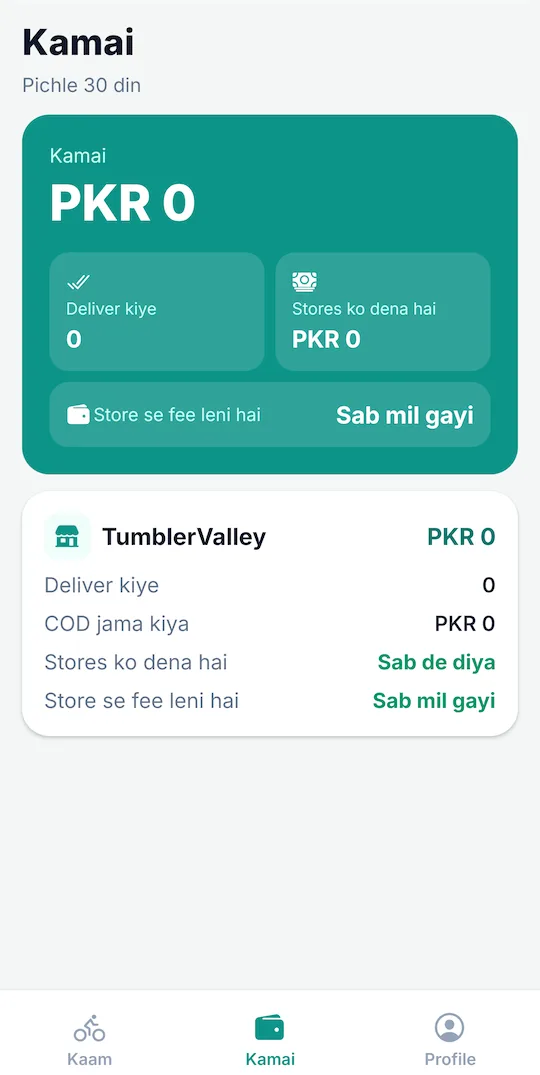
Customer names, phone numbers and addresses are blurred to protect their privacy.
The FABTRACK WordPress Plugin: Your Shop, Connected
The app does the heavy work. The small plugin adds what has to live inside WordPress: order statuses, tracking for your customers, cart recovery and a set of switch-on-when-you-need-it Extra Features for your shop pages.
One connect code
Copy a code from FABTRACK, paste it in WordPress, and your shop is linked. No courier keys inside WordPress. Everything is managed in the app.
Order statuses
Booked at PostEx and Booked at Leopards appear as real WooCommerce statuses (plus Out for delivery and Returned if you want them).
Shipment box on every order
Courier, CN and live status on the WooCommerce order page, with one click to open it in FABTRACK, copy the CN or message the customer. The orders list gets a FABTRACK column too.
Tracking for your customers
Delivery status in My Account, and a tracking page you create with the [fabtrack_track] shortcode. Customers search by CN, or by order number and phone.
Abandoned cart recovery
Carts with an email or phone number are sent to FABTRACK, which sends the reminders. The reminder link puts the items back in the cart.
Safer checkout
Reject wrong Pakistani mobile numbers before the order is placed, and add a “No offers” box so customers who say no are skipped by your campaigns.
Extra Features: switch on only what you need
Each feature has its own page with a live preview, colours, wording and a shortcode on or off switch. New ones keep being added.
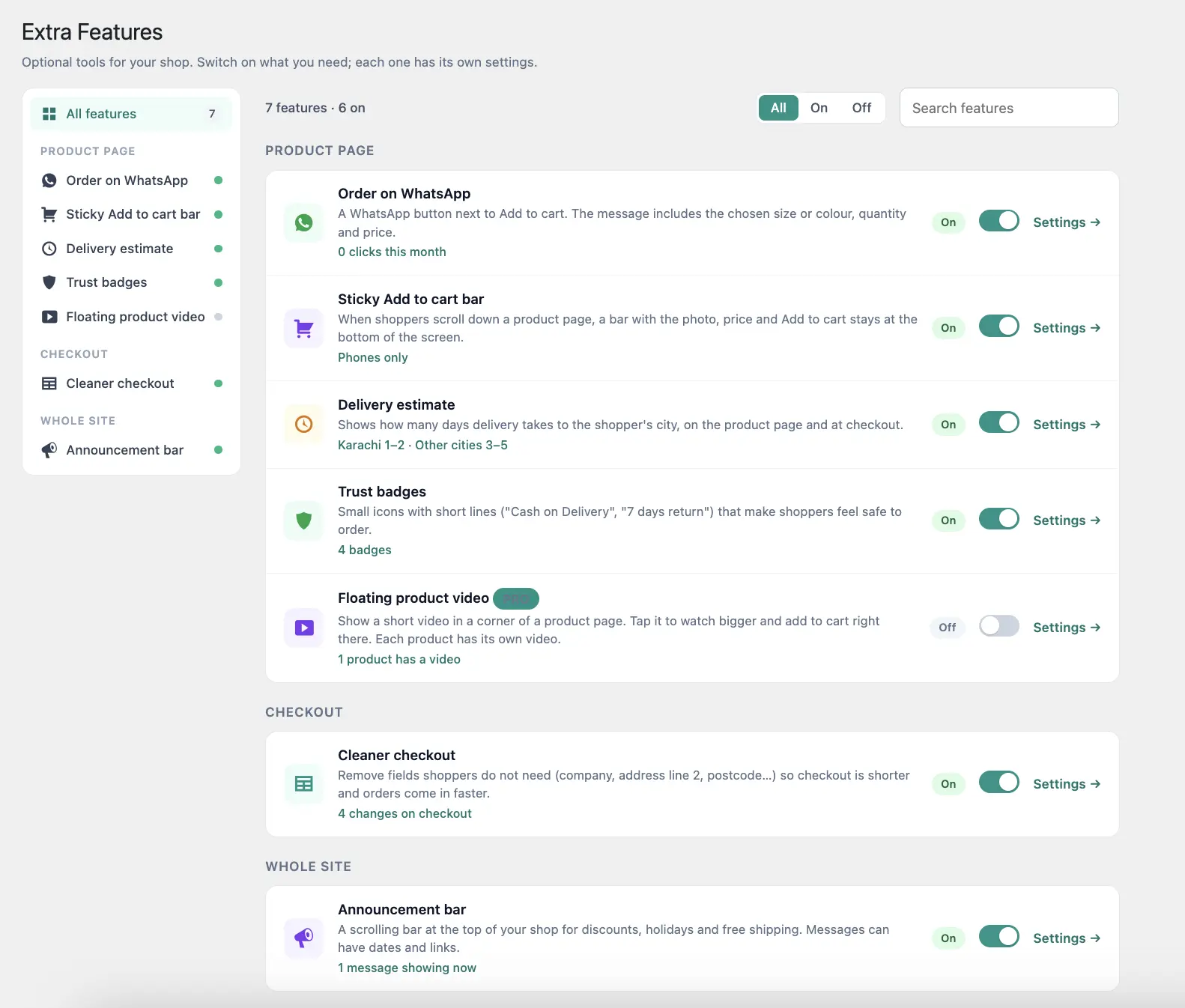
Order on WhatsApp
A WhatsApp button next to Add to cart. The message carries the chosen size or colour, quantity and price. English or Roman Urdu.
Sticky Add to cart bar
Photo, short title, price and Add to cart stay at the bottom of the phone screen while shoppers scroll.
Delivery estimate by city
“Karachi 1-2 days, Lahore 2-3 days.” Shoppers pick their city, and the estimate shows under the Order summary at checkout.
Trust badges
Cash on Delivery, 7-day return, 100% original. Pick icons, emojis or your own images, and style them your way.
Cleaner checkout
Remove company, address line 2, postcode and other fields your shoppers do not need. Works on the block checkout.
Floating product video
A small video bubble on the product page that opens a bigger player with the options and Add to cart. Each product has its own MP4 or GIF.
Announcement bar
A scrolling bar at the top of your shop for discounts, holidays and free shipping, with ready-made messages and dates.
Download the plugin from Settings inside your FABTRACK account. Order statuses, the shipment box, My Account tracking and the Extra Features are free. The floating product video, cart recovery, the checkout tools, the tracking page, the orders column and WhatsApp click counts are part of Pro.
Up and Running in Four Steps
Sign up and connect your store
Create your free account, then connect WooCommerce with its API keys or Shopify in one click. Add your PostEx or Leopards details in Settings.
Install the plugin (WooCommerce)
Upload the FABTRACK plugin and paste your connect code. Your orders, statuses and customer tracking are now linked to the app.
Book, track and get paid
Book parcels from the order page, follow every shipment, watch your COD and profit, and keep customers informed on WhatsApp and email.
Grow with campaigns
Switch on automations, send campaigns to your best customers, recover abandoned carts and use the Extra Features to sell more.
Simple Pricing in Rupees
Start free and try everything in Pro for 14 days. Then stay on Free, or choose Pro.
Free
PKR 0
Forever, for small stores
- ✓1 store (WooCommerce or Shopify)
- ✓Book up to 30 parcels a month with PostEx or Leopards, and print airway bills
- ✓Live parcel status in your orders and courier logs
- ✓One-click WhatsApp messages to customers
- ✓Warning on High risk orders
Pro
Everything in Free, plusMonthly
PKR 1,999
per month
Yearly
PKR 20,000
per year
Save PKR 3,988 compared with monthly
- ✓Unlimited booking, and your own riders
- ✓Full shipment journey, refreshed on demand
- ✓Fake-order risk score with the reasons, and call confirmation
- ✓COD settlement, courier fee and tax, Finance and Profit report
- ✓Full analytics: city-wise, trends, products, return reasons, and CSV export
Pay with Easypaisa, JazzCash, SadaPay or bank transfer. Upload your payment proof in the app and your plan is switched on after we check it.
FABTRACK vs Courier Plugins and Portals
Courier plugins create the parcel and stop there. FABTRACK runs everything around it.
| Feature | Courier plugin or portalOthers | FABTRACK |
|---|---|---|
| Book a parcel | ✓ | ✓ |
| PostEx, Leopards and your own riders in one place | ✕ | ✓ |
| Live tracking with the full journey | ✕ | ✓ |
| WooCommerce status updates itself | ✕ | ✓Delivered, Returned |
| Fake-order risk score | ✕ | ✓ |
| COD settlement and overdue alerts | ✕ | ✓ |
| Delivery rate, RTO and city-wise analytics | ✕ | ✓ |
| Real profit report | ✕ | ✓ |
| Branded order emails and WhatsApp messages | ✕ | ✓ |
| Campaigns and automations | ✕ | ✓ |
| Abandoned cart recovery | ✕ | ✓ |
| Customer tracking page on your website | ✕ | ✓ |
| Team roles for staff and accountants | ✕ | ✓ |
| Works with Shopify | ✕ | ✓ |
PostEx and Leopards are supported today, with TCS and more couriers on the way.
Built for the Way Ecommerce Works in Pakistan
Over 80% of online orders in Pakistan are Cash on Delivery. That means your business lives and dies by COD performance: how many orders are delivered, how quickly the cash comes back, and which cities send the most parcels back.
Most tools are built for prepaid markets where money is instant and returns are rare. FABTRACK is built for COD stores in Pakistan, and every feature follows how couriers and customers really behave here.
80%+
of Pakistan ecommerce orders are COD. FABTRACK is built around this reality.
20-35%
Industry average RTO in Pakistan. FABTRACK shows you where your returns come from, and warns you about risky orders before you ship.
Every order
COD settlement tracked, with courier fee and tax. You always know what your courier owes you.
- ✓Roman Urdu or English for emails and WhatsApp messages
- ✓03xx numbers fixed to 923xx so WhatsApp links always open
- ✓PostEx, Leopards and your own riders, side by side
- ✓Pakistani cities in the delivery estimate picker
- ✓PKR everywhere, Pakistan time for every date
- ✓Pay for Pro with Easypaisa, JazzCash, SadaPay or bank transfer
Frequently Asked Questions
What is Coming Next
FABTRACK grows every week. Here is what is being built next.
Android Apps on Google Play
FABTRACK for stores and FABTRACK Riders for delivery riders, to run orders, parcels and COD from your phone.
TCS and Other Couriers
TCS, M&P, Trax and more, under the same FABTRACK screens as PostEx and Leopards.
WhatsApp to Many Customers
Send a WhatsApp message to a whole customer group, in the same way you send email campaigns today.
Refunds and Bulk Actions
Refund an order and change the status of many orders at once, without opening WooCommerce.
Leopards Batch Booking and Invoices
Book many Leopards parcels in one go and see your Leopards invoices inside FABTRACK.
A Richer Dashboard
Success rate, top products and top cities at a glance on your dashboard.
Want early access to new features?
Join the WaitlistBuilt by FABXERS
FABTRACK is developed and maintained by FABXERS, a WooCommerce development agency based in Pakistan. We build apps, plugins and custom WooCommerce solutions for ecommerce stores that need more than what off-the-shelf tools offer.
FABTRACK started as an internal tool for our own WooCommerce stores. We built it because nothing else solved the specific problems of running a COD business in Pakistan. It has since grown from a tracking plugin into a full app for orders, couriers, cash, customers and marketing, and it now works with Shopify too. We use it ourselves every day.
If you need custom WooCommerce development, courier integrations, or store setup, you can reach us at fabxers.com.
Run Your Whole Store From One Place
Connect your WooCommerce or Shopify store, book PostEx, Leopards or your own riders, follow every parcel and every rupee of COD, and keep customers coming back.
Start with 14 days of Pro, free. Then keep the Free plan or choose Pro. Works with your existing PostEx or Leopards account.